---
title: Shared Links Management Page
description: The Shared Links Management Page offers a centralized, user-friendly view of all shared links—external demos, internal playbooks, and more—making it easy to manage and track shared assets across your organization.
---
[Skip to content](https://help.demostack.com/migration/articles/shared-links-management-page#main-content)
English
Show submenu for translations
[Customer portal](https://help.demostack.com/portal?hsLang=en)
![Logo.png\]](https://help.demostack.com/hs-fs/hubfs/Logo.png?height=19&name=Logo.png)
Open main navigation
Close main navigation
- English
Show submenu for translations
- [Customer portal](https://help.demostack.com/portal)
- [Visit our Website](https://www.demostack.com/)
[Visit our Website](https://www.demostack.com/)
Hello! How can we help you? Sign in to see all our KB Articles!
- There are no suggestions because the search field is empty.
1. [Demostack Help Center](https://help.demostack.com/migration/articles?hsLang=en)
2. [Admin Overview](https://help.demostack.com/migration/articles/admin-overview?hsLang=en)
# Shared Links Management Page
## The Shared Links Management Page offers a centralized, user-friendly view of all shared links—external demos, internal playbooks, and more—making it easy to manage and track shared assets across your organization.
---
### What Are Shared Links?
Shared links allow you to grant access to specific content within or outside of your organization. These links come in two primary types:
- **External Links**: Used to share assets such as tours or demos with users outside of your organization.
- **Internal Links**: Provide fast, convenient access to content like demos and playbooks for internal team members.
See related content [here](https://help.demostack.com/articles/presenter-overview?hsLang=en#sharing-sandboxes-tours)
---
### Key Features
**1. Centralized Link Management**
View and manage **all** shared links from one central location—saving time and simplifying workflows.
2\. **Permissions-Based Access**
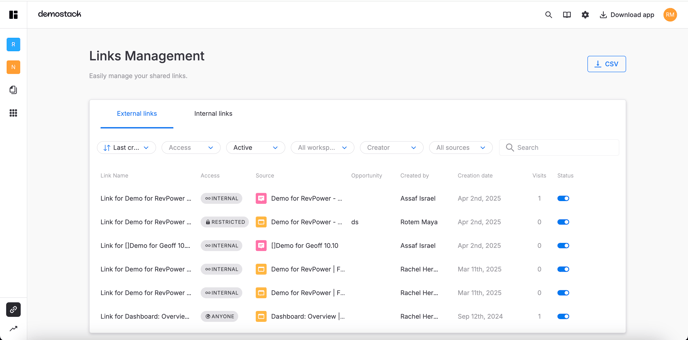
Every user can access the Shared Links Management Page. Each person will only see the links they have permission to view, ensuring content remains secure and private.
3\. **Categorization by Link Type**
Links are clearly separated into **External** and **Internal** categories, with intuitive filters to help you find what you’re looking for quickly.
4\. **Performance Metrics**
Gain insights into engagement by viewing visit counts for each link—perfect for tracking interest and reach.
**5. Individual Link Details**
Each link is listed with key information, including: Link name, URL, Source asset, Access level, Created date, Expiration date (if applicable)
6\. **Search & Filters**
Looking for a specific link? Just paste it into the search bar to instantly locate it and see related asset information.
---
### How to use it ?
Accessing and navigating the Shared Links Management Page is simple and intuitive. Here's how you can start managing all your links from one place:
Access the Shared Links Management Page:
1. **Go to the Left Side Panel -** From your dashboard, look at the **left-hand side navigation panel**.
2. **Click the "Link Management" CTA**
Clicking it will take you directly to the **Shared Links Management Page**, where you’ll see all links you have access to.
---
### See it in Action!
---
#### Pro Tips
- **Use Filters Smartly**: Combining filters with search can help you quickly isolate exactly the links you need.
- **Monitor Link Expirations**: Keep an eye on expiration dates to renew or remove old links before they become inactive.
- **Regularly Review External Links**: For added security, periodically audit external links and disable those no longer needed.
---
#### **💬 Need Help?**
If you have any questions, reach out to your Customer Success Manager or visit the[Help Center](https://help.demostack.com/articles?hsLang=en).
- [Onboarding](https://help.demostack.com/migration/articles/onboarding?hsLang=en#main-content)
- [Overview](https://help.demostack.com/migration/articles/onboarding?hsLang=en#overview)
- [Admin Overview](https://help.demostack.com/migration/articles/admin-overview?hsLang=en)
- [Builder Overview](https://help.demostack.com/migration/articles/builder-overview?hsLang=en)
- [Analytics](https://help.demostack.com/migration/articles/analytics?hsLang=en)
- [Integrations](https://help.demostack.com/migration/articles/integrations?hsLang=en)
- [Release Notes](https://help.demostack.com/migration/articles/release-notes?hsLang=en)
- [Troubleshooting](https://help.demostack.com/migration/articles/troubleshooting?hsLang=en)
[](https://www.demostack.com/)
Copyright © 2026, Demostack